Hearth and Hamlet Beginner Guide: Build a Stable Town
Follow a practical Hearth and Hamlet beginner route from the first campfire to automated resources, research, and a stable settlement.
Quick answer
- Hold the mouse button to gather quickly, improve the camp, and follow each blue tutorial arrow.
- Automate Food and Wood first, then assign every spare worker to the resource blocking your next objective.
- Move workers away from capped storage and upgrade the building that removes your current limit.
- Keep Food safe before spending on research, expansion, trade, or defense.
BUILD A COZY TOWN ONE CLICK AT A TIME! Hearth and Hamlet
Watch a release-day new save move from campfire gathering into worker assignment, Food and Wood automation, storage management, and early upgrades.
Continue reading
These related Hearth and Hamlet pages answer the next questions around this topic.
Your First Stable-Camp Route
The safest Hearth and Hamlet beginner route is to follow the opening objectives until Food and Wood run without constant clicking. Hold the mouse button to gather at maximum speed, improve the camp when prompted, and use the blue arrows to find each new interaction. Once the Fisherman's Hut and Woodcutter's Hut are available, assign spare workers and let automation carry the settlement.
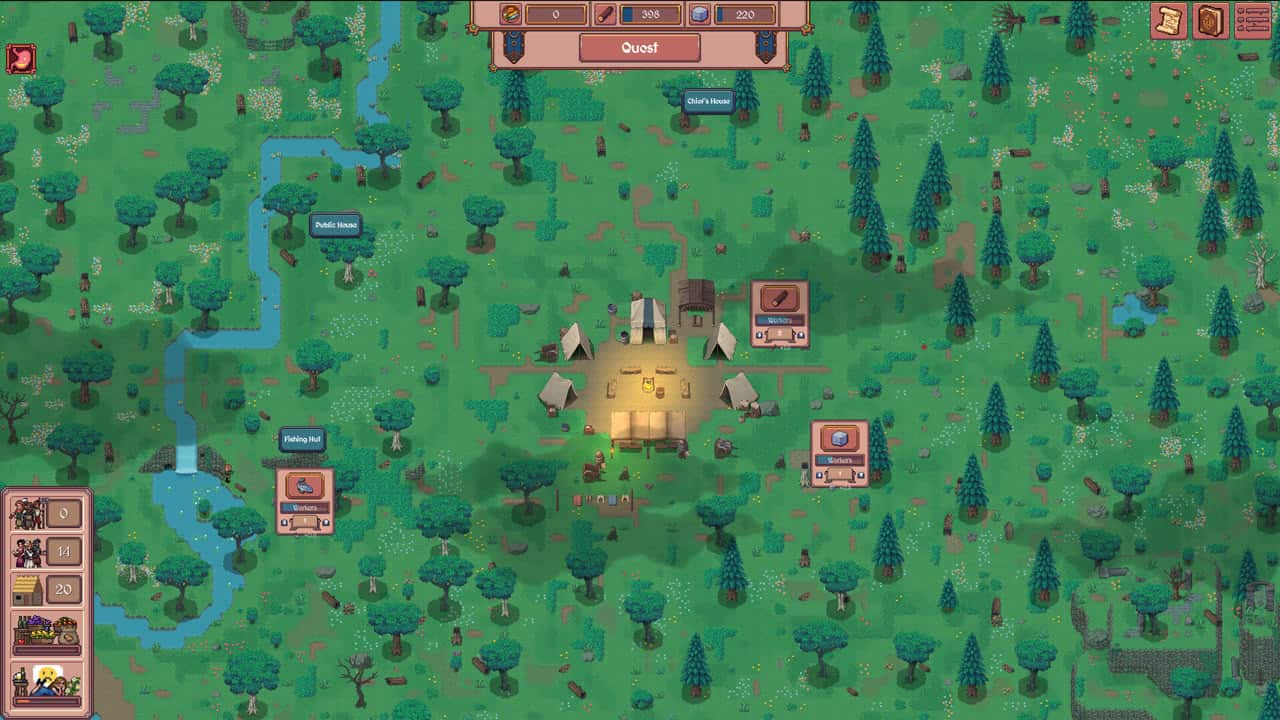
- Click and hold the active gathering control until the opening objective is complete.
- Open the Camp and Build controls when the tutorial asks you to improve the campsite.
- Follow each blue arrow to the next available location or action.
- Build the Fisherman's Hut and Woodcutter's Hut as the opening objectives introduce Food and Wood production.
- Use the up and down controls at a work location to assign each spare worker.
- After production starts, inspect the next cost and move labor toward the resource holding it back.
The spare-worker counter matters as much as the resource totals. Population growth supplies more workers, while every assignment commits part of that workforce to one production line. A worker sitting on a full storage bar produces no useful progress, so reassign that worker as soon as another resource becomes more urgent.
Choose Resources, Workers, and Buildings by Bottleneck
Food is the first resource to protect. The tutorial warns that an exhausted Food supply causes starvation, and very low Food stops population growth. Keep its production ahead of consumption before moving several workers into construction materials.
| Current situation | Best early response | Why it helps |
|---|---|---|
| Food is falling or nearly empty | Add a worker to Food | Protects population growth and avoids starvation |
| A quest or building waits on Wood | Shift one spare worker to Wood | Advances the next visible objective without emptying every other job |
| Wood storage is full | Remove a Wood worker | Frees labor while stored production cannot increase |
| A new cost asks for Stone or Gold | Move workers in small increments | Funds the current requirement while Food and Wood continue running |
| A building offers capacity or storage | Upgrade the limit you are reaching | Creates room for more workers, resources, or progression |
Avoid a permanent worker ratio. The useful assignment changes whenever the next building, research choice, storage cap, population need, or defense cost changes. Move one or two workers, watch the resource trend, and adjust again. This keeps the settlement responsive without shutting down a whole production line.
Treat each upgrade as a worker-and-resource contract. Spend when the result adds the job slot, storage, resource, structure, or research access that resolves the current constraint. An upgrade with no immediate use can wait behind Food security and the next progression requirement.
The Checkpoints From Camp to Kingdom
The game's long progression starts with manual gathering and becomes a broader settlement economy. These checkpoints give you a practical way to judge whether the current layer is stable enough for the next one.
- Manual camp: Gather quickly, improve the camp, and complete the guided opening actions.
- Early automation: Put workers into Food and Wood so the basic loop continues without constant input.
- Capacity growth: Expand buildings and storage when worker slots or resource caps stop progress.
- Permanent research: Unlock technologies, buildings, magic, and upgrades that open new settlement systems.
- Kingdom economy: Balance policies, laws, taxation, trade routes, guards, soldiers, and the resources that support them.
Defense belongs to the economy. Higher enemy strength and soldier upkeep add demands to the same resource system that supports construction and research. Enter that layer with stable basic production and enough flexibility to reassign workers.
Recover From Common Early Stalls
Most opening stalls come from one visible limit. Read the Food trend, spare-worker count, storage bars, and next listed cost before buying a broad upgrade.
- If Food is very low, move available labor to Food before funding a new project.
- If no worker is spare, remove one from a capped or less urgent resource.
- If the required resource is capped, add storage capacity before assigning more production.
- If progress remains slow, focus on the next listed cost and change one assignment at a time.
A stable hamlet grows by solving one visible constraint at a time. Small reallocations are easy to reverse, and they reveal whether labor, storage, or the next unlock is the real problem.